This is a learning model. The exact workflow depends on the organization’s architecture, policies, authentication methods, and licensed CyberArk capabilities.
CyberArk at a Glance
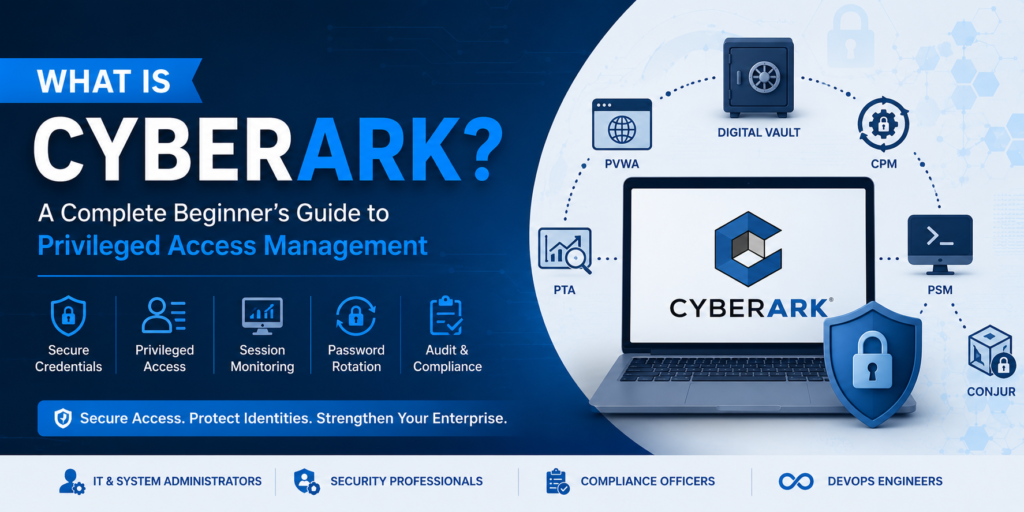
- CyberArk is a leading Privileged Access Management (PAM) platform.
- It protects administrator accounts, privileged credentials, SSH keys, and application secrets.
- Credentials are stored securely inside the Digital Vault.
- Users access systems through controlled workflows without knowing privileged passwords.
- CyberArk automates password rotation, session monitoring, auditing, and compliance.
- Large enterprises use CyberArk to reduce cyber risk and secure critical infrastructure.
What Is CyberArk?
CyberArk is both a cybersecurity company and a name commonly used for its privileged-access and identity-security solutions. In practical enterprise conversations, “CyberArk” often refers to the PAM environment that protects privileged credentials and controls administrative access.
A normal user account may allow someone to read email or open a business application. A privileged account can do far more: create users, change security settings, install software, modify databases, access sensitive records, alter cloud infrastructure, or control production systems. Because of that power, privileged credentials are highly valuable to attackers and must be protected more strictly than ordinary passwords. CyberArk helps replace insecure practices—such as sharing administrator passwords through email, spreadsheets, chat, or personal notebooks—with centrally governed access. Depending on the deployment, users can request access, receive approval, connect through a controlled session, and complete their task without seeing the underlying password.Protect
Secure high-risk passwords, keys, secrets, and access paths instead of leaving them exposed.Control
Define who can access which account, for what reason, and under what conditions.Monitor
Record or observe privileged activity to support investigations, accountability, and audits.Automate
Change, verify, and reconcile credentials according to security policy.What Is Privileged Access?
Privileged access means elevated permission that allows a person, application, service, or machine to perform sensitive operations. The identity using that access might be a system administrator, database administrator, cloud engineer, application service, automated process, vendor, or emergency support user.Why Do Organizations Need CyberArk?
Enterprises operate thousands of systems across data centres, offices, SaaS applications, public cloud, private cloud, containers, databases, and network infrastructure. Each environment can contain credentials or roles with the power to alter critical operations.
Credential theft
Attackers frequently seek administrator credentials because one compromised privileged account can unlock many systems.Shared passwords
When teams share the same password, accountability is weak and offboarding becomes difficult.Stale access
Standing permissions and old accounts can remain active longer than the business task requires.Embedded secrets
Passwords or API keys stored in scripts, configuration files, and pipelines can be exposed.Limited visibility
Without session monitoring, security teams may know who logged in but not what happened next.Audit pressure
Regulated organizations need reliable evidence of access control, review, and privileged activity.How Does CyberArk Work?
At a high level, CyberArk separates the user from the privileged credential. The password, SSH key, or other secret is managed centrally, while the user receives governed access to perform an approved task. The exact sequence varies, but a common PAM workflow looks like this:Discover and identify
Security teams identify privileged accounts, owners, target systems, dependencies, and risk.Onboard the account
The account is added to the appropriate Safe and linked to a platform or management policy.Secure the credential
The password or key is protected in the Digital Vault rather than shared directly among users.Authenticate and authorize
The user signs in, and CyberArk checks permissions, policy conditions, and any required approval.Launch controlled access
The session may be brokered through PSM so the user connects without learning the credential.Monitor the session
Privileged activity can be recorded, audited, and reviewed according to organizational policy.Manage the password
CPM can change or verify the credential and reconcile it when the managed and target passwords differ.Review and improve
Logs, alerts, reports, and access reviews help teams investigate events and strengthen controls.Core CyberArk PAM Components Explained
The classic CyberArk PAM architecture is modular. Each component has a specific responsibility, and together they provide credential protection, policy enforcement, password management, session control, and operational resilience.
Digital Vault
The secure repository at the centre of the solution. It stores and protects privileged credentials, SSH keys, and related sensitive information under strict access controls.PVWA
Privileged Vault Web Access is the web interface used to search for accounts, request access, manage Safes, review activity, and perform authorized administrative tasks.CPM
The Central Policy Manager changes, verifies, and reconciles managed passwords according to platform and policy settings.PSM
Privileged Session Manager brokers, isolates, monitors, and can record privileged sessions to target systems without exposing credentials to the user.PSM for SSH
Provides controlled privileged access for SSH-based connections, commonly used for Linux, Unix, and network-device administration.Disaster Recovery Vault
Supports business continuity by providing a standby Vault capability as part of a properly designed disaster-recovery architecture.Supporting and Broader Identity-Security Capabilities
CyberArk deployments may also include threat analytics, secrets management for applications and DevOps, endpoint privilege controls, secure vendor or remote access, cloud access, identity threat detection, and just-in-time or zero-standing-privilege approaches. The exact product names and capabilities depend on licensing, deployment model, and the organization’s identity-security strategy.Real-World CyberArk Example
A DBA needs production access
A database administrator must investigate a critical production incident. The organization does not want the DBA password shared, copied, or permanently known by multiple team members. Goal: permit the work while preserving control, accountability, and credential security.- The DBA signs in and requests the approved production account.
- CyberArk checks the user’s permissions and any required approval.
- PSM launches the database session using the protected credential.
- The DBA performs the authorized investigation without seeing the password.
- The session is monitored or recorded according to policy.
- After the task, CPM can rotate or verify the credential.
- Security and audit teams retain evidence of who accessed the system and when.
CyberArk vs PAM vs IAM: What Is the Difference?
| Term | What it means | Main focus | Simple example |
|---|---|---|---|
| IAM | Identity and Access Management is the broader discipline for managing identities and access across an organization. | User lifecycle, authentication, authorization, access requests, and general workforce access. | Giving a new employee access to email and business applications. |
| PAM | Privileged Access Management is the security discipline focused on elevated and high-risk access. | Privileged credentials, admin sessions, least privilege, approvals, monitoring, and rotation. | Controlling access to a domain administrator or root account. |
| CyberArk | A cybersecurity vendor and identity-security platform with widely used PAM solutions. | Technology and workflows used to implement privileged-access and related identity-security controls. | Vaulting an administrator password and launching a monitored PSM session. |
In one sentence: IAM is the broad access-management field, PAM is the high-risk privileged-access discipline, and CyberArk is a platform used to implement PAM and broader identity-security capabilities.
Common CyberArk Use Cases
Administrator account protection
Secure domain, local administrator, root, database, application, and network-device accounts.Password rotation
Change privileged passwords automatically instead of depending on manual updates and shared records.Session isolation and recording
Broker privileged access through a controlled path and preserve evidence for review or investigation.Third-party access
Provide governed vendor or contractor access to critical systems without broadly exposing internal credentials.Service-account management
Manage accounts used by applications, services, scheduled tasks, and other non-interactive processes.Application and DevOps secrets
Reduce hardcoded passwords, keys, and tokens in applications, scripts, pipelines, and cloud-native workloads.Cloud privileged access
Apply stronger controls to cloud administrators, infrastructure engineers, and high-impact roles.Audit and compliance evidence
Support access reviews, investigations, and regulatory reporting with detailed privileged-access records.Key Features and Business Benefits
CyberArk’s technical features are valuable because they address real business risks. A well-implemented PAM program can reduce reliance on shared credentials, shorten the lifetime of exposed passwords, strengthen accountability, and help organizations demonstrate control over critical access.- Central credential protection: sensitive credentials are managed in a controlled repository.
- Automated password management: scheduled or event-driven changes reduce long-lived exposure.
- Credential isolation: users can connect without necessarily seeing or copying the password.
- Session monitoring: privileged activity can be observed, recorded, and reviewed.
- Least-privilege enforcement: access can be limited to approved users, systems, and time periods.
- Improved accountability: individual user identity can be linked to use of a shared privileged account.
- Operational consistency: policies standardize onboarding, access, rotation, and audit processes.
- Incident response support: logs and recordings provide context during investigations.
How Is CyberArk Deployed?
The appropriate deployment model depends on security requirements, existing infrastructure, regulatory needs, operational maturity, and cloud strategy.Self-hosted PAM
The organization deploys and operates core components such as the Vault, PVWA, CPM, and PSM within its own controlled environment.Cloud-delivered services
CyberArk capabilities can also be consumed through cloud-delivered services, reducing some infrastructure-management responsibilities.Hybrid architecture
Many enterprises combine self-hosted and cloud capabilities to support existing systems, SaaS, public cloud, remote access, and modern workloads.Who Should Learn CyberArk?
CyberArk is suitable for people who want to work in Privileged Access Management, identity security, infrastructure security, or enterprise cybersecurity. It is particularly relevant to professionals who already understand how servers, directories, networks, databases, cloud systems, or applications are administered.Good backgrounds
Windows or Linux administration, Active Directory, networking, cybersecurity, IAM, SOC, database support, cloud, DevOps, infrastructure operations, and application support.Freshers can also start
A fresher can learn CyberArk, but should first build basic understanding of Windows, networking, authentication, accounts, permissions, servers, and cybersecurity concepts.Recommended Learning Roadmap
Build foundations
Windows, Linux basics, Active Directory, DNS, ports, authentication, networking, and security fundamentals.Learn core PAM
Privileged accounts, Safes, permissions, platforms, account onboarding, Master Policy, and workflows.Practise components
Vault, PVWA, CPM, PSM, installation concepts, password change, verification, reconciliation, and session access.Develop job skills
Troubleshooting, logs, integrations, DR concepts, APIs, automation, real scenarios, resume, and interviews.CyberArk Career Opportunities
CyberArk skills are used in roles across PAM operations, engineering, implementation, consulting, architecture, IAM, security operations, infrastructure security, and cloud identity. Job titles vary by employer, and many entry-level openings are advertised under broader terms such as IAM Analyst, PAM Support Engineer, Identity Security Analyst, or Security Operations Engineer.| Role | Typical responsibilities | Skills employers may expect |
|---|---|---|
| CyberArk Administrator | Manage users, Safes, platforms, accounts, policies, access, monitoring, and daily operations. | PVWA, CPM, PSM, account onboarding, permissions, operational support. |
| PAM Support Engineer | Handle incidents, requests, failed password changes, connection issues, monitoring, and user support. | Troubleshooting, logs, Windows, networking, ticketing, communication. |
| CyberArk Engineer | Install, configure, integrate, upgrade, automate, and improve CyberArk environments. | Architecture, implementation, integrations, APIs, scripting, DR, security design. |
| PAM Consultant | Gather requirements, design controls, guide onboarding, implement solutions, and advise clients. | Consulting, documentation, stakeholder management, technical depth, project delivery. |
| PAM Architect | Design enterprise strategy, target architecture, integrations, resilience, governance, and roadmap. | Large-scale architecture, identity security, cloud, risk, compliance, leadership. |
Frequently Asked Questions
1. What is CyberArk in simple words?
2. What is CyberArk PAM?
3. Is CyberArk only a password vault?
4. What are the main CyberArk components?
5. What is the difference between PVWA, CPM, and PSM?
6. Does CyberArk require coding?
7. Is CyberArk difficult to learn?
8. Can a fresher learn CyberArk?
9. Is CyberArk the same as IAM?
10. Is CyberArk a good career option?
Learn CyberArk Through Real Enterprise Practice
AccessSphere’s live CyberArk PAM training is designed to move beyond definitions. Learners practise architecture, installation concepts, Vault and component configuration, Safe management, account onboarding, password rotation, PSM sessions, troubleshooting, and interview scenarios.Official Sources and Further Reading
Understand privileged accounts, the Digital Vault, PVWA, CPM, PSM, password rotation, session monitoring, enterprise use cases, and the skills needed to begin a CyberArk career.
This is a learning model. The exact workflow depends on the organization's architecture, policies, authentication methods, and licensed CyberArk capabilities.
CyberArk at a Glance
- CyberArk is a leading Privileged Access Management (PAM) platform.
- It protects administrator accounts, privileged credentials, SSH keys, and application secrets.
- Credentials are stored securely inside the Digital Vault.
- Users access systems through controlled workflows without knowing privileged passwords.
- CyberArk automates password rotation, session monitoring, auditing, and compliance.
- Large enterprises use CyberArk to reduce cyber risk and secure critical infrastructure.
CyberArk Key Facts
| Category | Answer |
|---|---|
| What is CyberArk? | An identity security and Privileged Access Management platform. |
| Primary purpose | Protect privileged accounts, credentials, sessions, keys, and secrets. |
| Core components | Digital Vault, PVWA, CPM, PSM, and PSM for SSH. |
| Typical users | Administrators, security teams, engineers, vendors, and applications. |
| Main security benefit | Users can access critical systems without directly knowing privileged passwords. |
CyberArk is an identity-security and Privileged Access Management platform used to protect high-risk access to servers, databases, cloud environments, network devices, applications, and other critical systems. It can secure credentials in a Digital Vault, control who may use them, broker and record privileged sessions, and automatically manage password changes so administrators do not need to share or permanently know powerful credentials.
What Is CyberArk?
CyberArk is both a cybersecurity company and a name commonly used for its privileged-access and identity-security solutions. In practical enterprise conversations, “CyberArk” often refers to the PAM environment that protects privileged credentials and controls administrative access.
A normal user account may allow someone to read email or open a business application. A privileged account can do far more: create users, change security settings, install software, modify databases, access sensitive records, alter cloud infrastructure, or control production systems. Because of that power, privileged credentials are highly valuable to attackers and must be protected more strictly than ordinary passwords.
CyberArk helps replace insecure practices—such as sharing administrator passwords through email, spreadsheets, chat, or personal notebooks—with centrally governed access. Depending on the deployment, users can request access, receive approval, connect through a controlled session, and complete their task without seeing the underlying password.
You may see Idira on current official CyberArk product pages. It is the broader identity-security platform branding now used by CyberArk. In hiring, projects, certifications, and training, employers still commonly use familiar terms such as CyberArk PAM, Digital Vault, PVWA, CPM, and PSM.
Protect
Secure high-risk passwords, keys, secrets, and access paths instead of leaving them exposed.
Control
Define who can access which account, for what reason, and under what conditions.
Monitor
Record or observe privileged activity to support investigations, accountability, and audits.
Automate
Change, verify, and reconcile credentials according to security policy.
What Is Privileged Access?
Privileged access means elevated permission that allows a person, application, service, or machine to perform sensitive operations. The identity using that access might be a system administrator, database administrator, cloud engineer, application service, automated process, vendor, or emergency support user.
The danger is not limited to a password being stolen. Organizations also face excessive standing access, abandoned accounts, unrotated secrets, hardcoded credentials, uncontrolled vendor access, weak approval processes, and poor visibility into what a privileged user actually did during a session.
Why Do Organizations Need CyberArk?
Enterprises operate thousands of systems across data centres, offices, SaaS applications, public cloud, private cloud, containers, databases, and network infrastructure. Each environment can contain credentials or roles with the power to alter critical operations.
Credential theft
Attackers frequently seek administrator credentials because one compromised privileged account can unlock many systems.
Shared passwords
When teams share the same password, accountability is weak and offboarding becomes difficult.
Stale access
Standing permissions and old accounts can remain active longer than the business task requires.
Embedded secrets
Passwords or API keys stored in scripts, configuration files, and pipelines can be exposed.
Limited visibility
Without session monitoring, security teams may know who logged in but not what happened next.
Audit pressure
Regulated organizations need reliable evidence of access control, review, and privileged activity.
CyberArk addresses these problems by bringing privileged accounts under policy-based management. It can help security teams reduce password exposure, limit access according to business need, monitor sessions, and create an audit trail for reviews and investigations.
How Does CyberArk Work?
At a high level, CyberArk separates the user from the privileged credential. The password, SSH key, or other secret is managed centrally, while the user receives governed access to perform an approved task. The exact sequence varies, but a common PAM workflow looks like this:
Discover and identify
Security teams identify privileged accounts, owners, target systems, dependencies, and risk.
Onboard the account
The account is added to the appropriate Safe and linked to a platform or management policy.
Secure the credential
The password or key is protected in the Digital Vault rather than shared directly among users.
Authenticate and authorize
The user signs in, and CyberArk checks permissions, policy conditions, and any required approval.
Launch controlled access
The session may be brokered through PSM so the user connects without learning the credential.
Monitor the session
Privileged activity can be recorded, audited, and reviewed according to organizational policy.
Manage the password
CPM can change or verify the credential and reconcile it when the managed and target passwords differ.
Review and improve
Logs, alerts, reports, and access reviews help teams investigate events and strengthen controls.
CyberArk is not simply a place to save passwords. A production PAM program also depends on account ownership, Safe design, platform configuration, access permissions, approval workflows, password dependencies, network connectivity, session policies, operational support, disaster recovery, and troubleshooting.
Core CyberArk PAM Components Explained
The classic CyberArk PAM architecture is modular. Each component has a specific responsibility, and together they provide credential protection, policy enforcement, password management, session control, and operational resilience.
Digital Vault
The secure repository at the centre of the solution. It stores and protects privileged credentials, SSH keys, and related sensitive information under strict access controls.
PVWA
Privileged Vault Web Access is the web interface used to search for accounts, request access, manage Safes, review activity, and perform authorized administrative tasks.
CPM
The Central Policy Manager changes, verifies, and reconciles managed passwords according to platform and policy settings.
PSM
Privileged Session Manager brokers, isolates, monitors, and can record privileged sessions to target systems without exposing credentials to the user.
PSM for SSH
Provides controlled privileged access for SSH-based connections, commonly used for Linux, Unix, and network-device administration.
Disaster Recovery Vault
Supports business continuity by providing a standby Vault capability as part of a properly designed disaster-recovery architecture.
Supporting and Broader Identity-Security Capabilities
CyberArk deployments may also include threat analytics, secrets management for applications and DevOps, endpoint privilege controls, secure vendor or remote access, cloud access, identity threat detection, and just-in-time or zero-standing-privilege approaches. The exact product names and capabilities depend on licensing, deployment model, and the organization's identity-security strategy.
Do not treat every CyberArk product as a core self-hosted PAM component. For interview preparation, first master the purpose and interaction of the Vault, PVWA, CPM, PSM, Safes, Platforms, Accounts, and permissions. Then learn the additional modules relevant to the role.
Real-World CyberArk Example
A DBA needs production access
A database administrator must investigate a critical production incident. The organization does not want the DBA password shared, copied, or permanently known by multiple team members.
Goal: permit the work while preserving control, accountability, and credential security.
- The DBA signs in and requests the approved production account.
- CyberArk checks the user's permissions and any required approval.
- PSM launches the database session using the protected credential.
- The DBA performs the authorized investigation without seeing the password.
- The session is monitored or recorded according to policy.
- After the task, CPM can rotate or verify the credential.
- Security and audit teams retain evidence of who accessed the system and when.
This is why PAM is more than password storage. The value comes from combining credential protection, access governance, session control, automation, and auditable accountability.
CyberArk vs PAM vs IAM: What Is the Difference?
| Term | What it means | Main focus | Simple example |
|---|---|---|---|
| IAM | Identity and Access Management is the broader discipline for managing identities and access across an organization. | User lifecycle, authentication, authorization, access requests, and general workforce access. | Giving a new employee access to email and business applications. |
| PAM | Privileged Access Management is the security discipline focused on elevated and high-risk access. | Privileged credentials, admin sessions, least privilege, approvals, monitoring, and rotation. | Controlling access to a domain administrator or root account. |
| CyberArk | A cybersecurity vendor and identity-security platform with widely used PAM solutions. | Technology and workflows used to implement privileged-access and related identity-security controls. | Vaulting an administrator password and launching a monitored PSM session. |
In one sentence: IAM is the broad access-management field, PAM is the high-risk privileged-access discipline, and CyberArk is a platform used to implement PAM and broader identity-security capabilities.
CyberArk vs Traditional Password Manager
| Feature | CyberArk | Password Manager |
|---|---|---|
| Password Rotation | Automatic | Mostly Manual |
| Session Recording | Yes | No |
| Approval Workflow | Yes | Limited |
| Credential Isolation | Yes | No |
| Enterprise PAM | Yes | No |
| Compliance Reporting | Yes | Limited |
Common CyberArk Use Cases
Administrator account protection
Secure domain, local administrator, root, database, application, and network-device accounts.
Password rotation
Change privileged passwords automatically instead of depending on manual updates and shared records.
Session isolation and recording
Broker privileged access through a controlled path and preserve evidence for review or investigation.
Third-party access
Provide governed vendor or contractor access to critical systems without broadly exposing internal credentials.
Service-account management
Manage accounts used by applications, services, scheduled tasks, and other non-interactive processes.
Application and DevOps secrets
Reduce hardcoded passwords, keys, and tokens in applications, scripts, pipelines, and cloud-native workloads.
Cloud privileged access
Apply stronger controls to cloud administrators, infrastructure engineers, and high-impact roles.
Audit and compliance evidence
Support access reviews, investigations, and regulatory reporting with detailed privileged-access records.
Key Features and Business Benefits
CyberArk's technical features are valuable because they address real business risks. A well-implemented PAM program can reduce reliance on shared credentials, shorten the lifetime of exposed passwords, strengthen accountability, and help organizations demonstrate control over critical access.
- Central credential protection: sensitive credentials are managed in a controlled repository.
- Automated password management: scheduled or event-driven changes reduce long-lived exposure.
- Credential isolation: users can connect without necessarily seeing or copying the password.
- Session monitoring: privileged activity can be observed, recorded, and reviewed.
- Least-privilege enforcement: access can be limited to approved users, systems, and time periods.
- Improved accountability: individual user identity can be linked to use of a shared privileged account.
- Operational consistency: policies standardize onboarding, access, rotation, and audit processes.
- Incident response support: logs and recordings provide context during investigations.
CyberArk does not remove the need for sound governance. Organizations still need accurate account ownership, clean access design, strong authentication, timely reviews, secure network architecture, backup and disaster recovery, monitoring, and trained administrators.
How Is CyberArk Deployed?
The appropriate deployment model depends on security requirements, existing infrastructure, regulatory needs, operational maturity, and cloud strategy.
Self-hosted PAM
The organization deploys and operates core components such as the Vault, PVWA, CPM, and PSM within its own controlled environment.
Cloud-delivered services
CyberArk capabilities can also be consumed through cloud-delivered services, reducing some infrastructure-management responsibilities.
Hybrid architecture
Many enterprises combine self-hosted and cloud capabilities to support existing systems, SaaS, public cloud, remote access, and modern workloads.
For learners, self-hosted core components are especially useful for understanding architecture, installation, Vault connectivity, component communication, account onboarding, password management, and troubleshooting. Modern roles may additionally require knowledge of cloud access, APIs, automation, and secrets management.
Who Should Learn CyberArk?
CyberArk is suitable for people who want to work in Privileged Access Management, identity security, infrastructure security, or enterprise cybersecurity. It is particularly relevant to professionals who already understand how servers, directories, networks, databases, cloud systems, or applications are administered.
Good backgrounds
Windows or Linux administration, Active Directory, networking, cybersecurity, IAM, SOC, database support, cloud, DevOps, infrastructure operations, and application support.
Freshers can also start
A fresher can learn CyberArk, but should first build basic understanding of Windows, networking, authentication, accounts, permissions, servers, and cybersecurity concepts.
Recommended Learning Roadmap
Build foundations
Windows, Linux basics, Active Directory, DNS, ports, authentication, networking, and security fundamentals.
Learn core PAM
Privileged accounts, Safes, permissions, platforms, account onboarding, Master Policy, and workflows.
Practise components
Vault, PVWA, CPM, PSM, installation concepts, password change, verification, reconciliation, and session access.
Develop job skills
Troubleshooting, logs, integrations, DR concepts, APIs, automation, real scenarios, resume, and interviews.
Do not stop after memorizing component definitions. Employers value candidates who can explain why an account failed to change, how to troubleshoot a PSM connection, how Safe permissions affect access, what reconciliation does, how components communicate, and how a real onboarding request moves from discovery to production support.
CyberArk Career Opportunities
CyberArk skills are used in roles across PAM operations, engineering, implementation, consulting, architecture, IAM, security operations, infrastructure security, and cloud identity. Job titles vary by employer, and many entry-level openings are advertised under broader terms such as IAM Analyst, PAM Support Engineer, Identity Security Analyst, or Security Operations Engineer.
| Role | Typical responsibilities | Skills employers may expect |
|---|---|---|
| CyberArk Administrator | Manage users, Safes, platforms, accounts, policies, access, monitoring, and daily operations. | PVWA, CPM, PSM, account onboarding, permissions, operational support. |
| PAM Support Engineer | Handle incidents, requests, failed password changes, connection issues, monitoring, and user support. | Troubleshooting, logs, Windows, networking, ticketing, communication. |
| CyberArk Engineer | Install, configure, integrate, upgrade, automate, and improve CyberArk environments. | Architecture, implementation, integrations, APIs, scripting, DR, security design. |
| PAM Consultant | Gather requirements, design controls, guide onboarding, implement solutions, and advise clients. | Consulting, documentation, stakeholder management, technical depth, project delivery. |
| PAM Architect | Design enterprise strategy, target architecture, integrations, resilience, governance, and roadmap. | Large-scale architecture, identity security, cloud, risk, compliance, leadership. |
Frequently Asked Questions
1. What is CyberArk in simple words?
CyberArk is a security platform that protects powerful administrator accounts and credentials. It helps organizations control who can use privileged access, monitor what happens during the session, and manage passwords automatically.
2. What is CyberArk PAM?
CyberArk PAM refers to CyberArk's Privileged Access Management capabilities. PAM secures, controls, and monitors elevated access to critical systems, accounts, roles, credentials, keys, and secrets.
3. Is CyberArk only a password vault?
No. Credential vaulting is central, but a complete CyberArk PAM implementation also includes access control, approval workflows, password change and reconciliation, session isolation, recording, audit, monitoring, integrations, and operational processes.
4. What are the main CyberArk components?
The commonly studied core self-hosted PAM components are the Digital Vault, PVWA, CPM, PSM, PSM for SSH, and disaster-recovery capabilities. Organizations may deploy additional CyberArk identity-security, analytics, endpoint, cloud-access, and secrets-management offerings.
5. What is the difference between PVWA, CPM, and PSM?
PVWA is the web interface for accessing and administering the PAM environment. CPM manages passwords by changing, verifying, and reconciling them. PSM brokers and monitors privileged sessions to target systems.
6. Does CyberArk require coding?
Core administration does not require extensive software development. However, PowerShell, REST APIs, scripting, regular expressions, and automation knowledge can be valuable for integrations, operational efficiency, and advanced engineering roles.
7. Is CyberArk difficult to learn?
The basic concepts are manageable, but enterprise implementation and troubleshooting require practice. Knowledge of Windows, networking, authentication, Active Directory, accounts, permissions, and security fundamentals makes the learning process easier.
8. Can a fresher learn CyberArk?
Yes. Freshers can begin with IT and cybersecurity fundamentals, then learn PAM concepts and practise in a lab. Hands-on work with Safes, accounts, platforms, CPM, PSM, PVWA, and troubleshooting is more valuable than theory alone.
9. Is CyberArk the same as IAM?
No. IAM is the broader field of managing identities and access. PAM is the specialized part focused on elevated, high-risk access. CyberArk offers PAM and broader identity-security capabilities.
10. Is CyberArk a good career option?
CyberArk can be a strong specialization for professionals interested in PAM, IAM, infrastructure security, cloud security, and identity security. Career outcomes depend on practical skill, supporting IT knowledge, troubleshooting ability, project exposure, and the hiring market.
11. Does CyberArk support cloud platforms?
12. Which companies use CyberArk?
13. What are CyberArk Safes?
14. What is the CyberArk Digital Vault?
15. How long does it take to learn CyberArk?
Learn CyberArk Through Real Enterprise Practice
AccessSphere's live CyberArk PAM training is designed to move beyond definitions. Learners practise architecture, installation concepts, Vault and component configuration, Safe management, account onboarding, password rotation, PSM sessions, troubleshooting, and interview scenarios.