CYBERARK TRAINING
Master CyberArk
The Way Enterprises
Use It
Build hands-on CyberArk skills through instructor-led training, virtual labs, implementation scenarios, troubleshooting exercises, and interview-focused preparation.
- 25 Hours Expert-Led Training
- 40 Days Virtual Lab Access
- 1 Year Learning Material Access
- Real CyberArk Implementation Practice
Talk To Our CyberArk
Training Advisor
Get course details, batch timings & guidance.
- 🔒 Your information is secure with us.
25 Hours
Live Training
40 Days
Virtual Lab Access
1 Year
Material Access
Real Scenarios
Implementation Practice
Live Online Training
5 - 6 Weeks
Beginner to Advanced
Weekend & Weekdays
HANDS-ON LAB EXPERIENCE
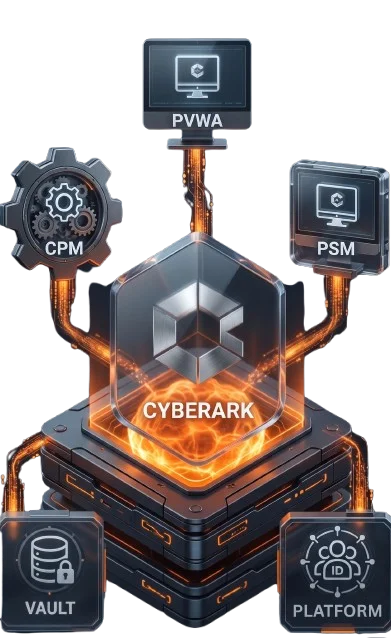
- Digital Vault
- PVWA Configuration
- CPM Setup
- PSM Connections
- Account Onboarding
- Password Rotation Policies
- Session Monitoring
- Real Use Cases

What You Will Learn in CyberArk Training
Build practical CyberArk administration skills and understand how Privileged Access Management is implemented to protect privileged accounts, credentials and enterprise systems.
Understand
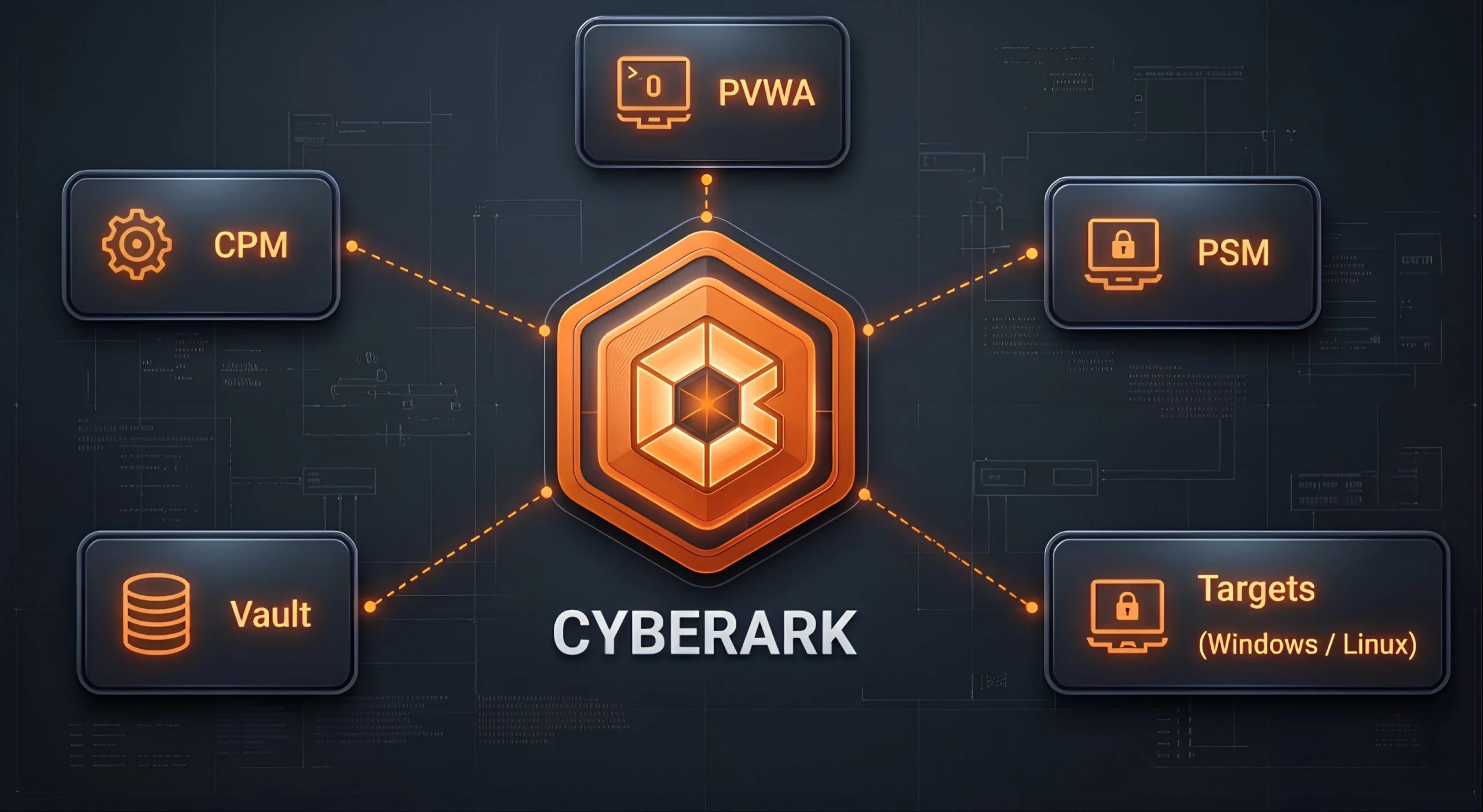
Understand CyberArk architecture, PAM concepts and how the core CyberArk components work together in a privileged access environment.
Administer
Develop practical administration skills for managing CyberArk components, configuration and day-to-day PAM operations.
Manage
Manage Safes, platforms, privileged accounts and password management workflows within CyberArk.
Onboard
Learn how privileged accounts are onboarded and managed using appropriate platforms, Safes and account-management workflows.
Secure Sessions
Understand privileged session management and how controlled access to target systems is handled through CyberArk.
Troubleshoot
Develop the ability to investigate common CyberArk administration issues involving authentication, connectivity, components and logs.
From CyberArk Fundamentals to Practical Administration
The training moves from PAM fundamentals and CyberArk concepts toward practical administration, account management, session management and troubleshooting.
CyberArk Training Syllabus
Explore the technical topics covered throughout the CyberArk training program, from PAM fundamentals and architecture to administration, account onboarding and troubleshooting.
Introduction to Privileged Access Management (PAM)
CyberArk Architecture & Components
Vault Installation & Configuration
PVWA, CPM & PSM Configuration
Safe Creation & Management
Privileged Account Onboarding
Password Rotation & Reconciliation
Privileged Session Management & Monitoring
LDAP Integration & Authentication
DR Vault & Backup Concepts
CyberArk Troubleshooting & Log Analysis
Real-World Project Scenarios & Interview Preparation
Practice What You Learn in a Virtual Lab
The hands-on lab gives you an environment to practice the concepts covered during training. Use guided exercises and practical scenarios to reinforce your CyberArk administration skills.
Dedicated Virtual Lab
Practice the concepts covered in the training through a dedicated virtual lab environment.
Guided Exercises
Follow practical exercises that reinforce CyberArk administration concepts introduced during the sessions.
Account Management Practice
Apply account onboarding, Safe management and password management concepts through practical exercises.
Session Practice
Practice privileged session workflows and understand how controlled access to target systems is handled.
Troubleshooting Scenarios
Work through common administration problems and use logs and configuration information to investigate issues.
Continued Practice
Use the available lab access to reinforce concepts and repeat practical exercises after the training sessions.
40 Days of Virtual Lab Access
Continue practicing the concepts covered during CyberArk training with access to the virtual lab environment.
CyberArk Training Highlights
Key features of the training program, including practical lab access and continued access to learning material.
25 Hours
Expert Training
40 Days
Virtual Lab Access
1 Year
Material Access
Practical
Administration Training
Build Practical Skills with CyberArk Training
CyberArk is used to help organizations protect privileged accounts, credentials and access to critical systems. Learning CyberArk can help IT and security professionals build skills in Privileged Access Management and identity security.
Enterprise PAM Skills
Understand how Privileged Access Management is used to secure privileged identities and critical enterprise systems.
CyberArk Administration
Develop practical knowledge of CyberArk administration, including Vault, PVWA, CPM, PSM, Safes and privileged accounts.
Privileged Access Security
Understand how privileged credentials and sessions are controlled within a PAM environment.
Career Development
Build practical knowledge relevant to CyberArk Administrator, PAM Engineer and related identity-security roles.
Career Opportunities After CyberArk Training
CyberArk skills can support career paths across Privileged Access Management, identity security and cybersecurity.
CyberArk & PAM Roles
Security Roles
Career Preparation
Prerequisites for CyberArk Training
No prior CyberArk experience is required. Basic IT knowledge is enough to get started.
Windows Administration
Basic understanding of Windows operating systems and administration concepts.
Networking Fundamentals
Knowledge of IP addressing, DNS, ports, protocols and basic network communication.
Cybersecurity Awareness
Helpful but not mandatory. Required security concepts are explained as part of the training.
Why Choose AccessSphere for CyberArk Training?
AccessSphere focuses on practical CyberArk administration, hands-on learning and real-world scenarios to help learners develop skills they can apply in enterprise PAM environments.
Learn by Doing
Build practical CyberArk skills through hands-on exercises covering administration, account management and common PAM workflows.
Enterprise-Style Lab
Practice with CyberArk components in a structured virtual lab environment designed to reinforce the concepts covered during training.
Real-World Troubleshooting
Work through common CyberArk administration issues involving accounts, authentication, connectivity, components and logs.
Career & Interview Preparation
Build practical knowledge for CyberArk Administrator and PAM Engineer roles with technical questions and scenario-based discussions.
CyberArk Training FAQs
Find answers to common questions about CyberArk training, hands-on labs, syllabus, prerequisites and interview preparation.
Yes. The training starts with PAM fundamentals and gradually moves into CyberArk administration, implementation and troubleshooting.
Yes. The training includes access to a virtual lab for practical exercises covering account management, password management, privileged sessions and troubleshooting.
The training covers CyberArk architecture, Vault, PVWA, CPM, PSM, Safes, privileged account onboarding, password management, session management, authentication, troubleshooting and real-world scenarios.
Yes. Account onboarding is covered as part of the practical CyberArk administration training, along with platform selection, password management and related configuration.
Yes. The program includes interview-focused preparation, common technical questions and practical scenario discussions.
Training is conducted using an enterprise-relevant CyberArk environment. Contact the training team for the current lab version available for your batch.
Start Building Real CyberArk Skills Today
25 Hours Expert Training • 40 Days Lab Access • 1 Year Material Access