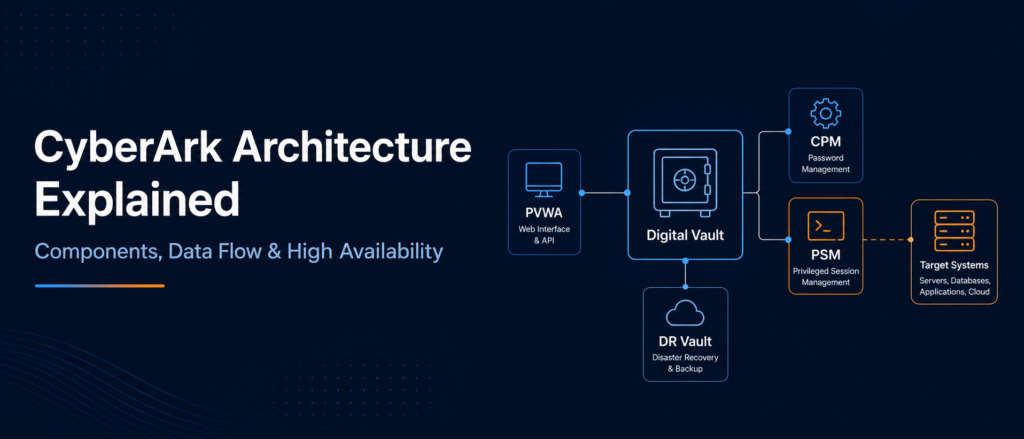
Learn how the Digital Vault, PVWA, CPM, PSM, PSM for SSH, Disaster Recovery Vault and supporting services work together to protect privileged credentials and sessions.
Conceptual diagram. Exact components and communication paths depend on the deployment model, product version, licensed capabilities and organizational design.
CyberArk Architecture at a Glance
- CyberArk architecture separates privileged users from the powerful credentials they need.
- The Digital Vault is the central protected storage and control layer.
- PVWA provides the web interface for access, requests, approvals, administration and monitoring.
- CPM changes, verifies and reconciles passwords based on platform policies.
- PSM and PSM for SSH broker and monitor sessions without revealing credentials to users.
- A DR Vault or distributed Vault design supports service continuity.
- Production environments commonly use redundant component servers, load balancing, segmentation, monitoring and tested recovery procedures.
What Is CyberArk Architecture?
CyberArk architecture is the technical design that combines protected credential storage, policy-based access, automated password management, privileged-session control, auditing and recovery. It allows authorized users and applications to use privileged access without unnecessarily revealing or sharing the underlying credentials.
In a traditional environment, administrators may directly know passwords for servers, databases or network devices. Those passwords can be shared, reused, recorded in documents or left unchanged for long periods. CyberArk changes the model by placing privileged credentials in a controlled system and making access pass through security policies.
The architecture is modular. One component securely stores privileged data, another provides the user interface, another manages passwords and another isolates sessions. This separation lets organizations scale individual services, control network paths and troubleshoot each stage of the privileged-access workflow.
This guide focuses on the familiar CyberArk Privileged Access Manager Self-Hosted architecture used in projects, training and interviews. CyberArk cloud-delivered services use a different service architecture and divide operational responsibility differently.
CyberArk Architecture Overview
CyberArk places a protected control layer between privileged identities and target systems. Users request or launch governed access while CyberArk manages the credential, session and audit trail.
High-Level CyberArk PAM Architecture
Logical architecture diagram; actual production designs vary by security zones, scale, redundancy, connectors and target technologies.
The Digital Vault is the centre of the architecture. PVWA, CPM, PSM and other authorized components communicate with it through the secure Vault protocol. Target systems remain outside the Vault and are reached by CPM or PSM through the required target-specific protocol or connector.
The Five Layers of CyberArk Architecture
Identity and access
Human users, services, applications and integrations authenticate and request privileged access.
Portal and policy
PVWA displays authorized accounts, supports requests and applies access controls.
Credential and session control
CPM manages credentials while PSM controls privileged connections.
Secure storage
The Digital Vault protects credentials, keys, configuration, Safe contents and audit data.
Targets and monitoring
Servers, databases, cloud resources, network devices, SIEM and analytics complete the flow.
Resilience
DR or distributed Vaults, redundant components, backup and recovery support continuity.
Core CyberArk Components Explained
A strong architecture explanation should describe both what each component does and how it interacts with the rest of the environment.
1. Digital Vault
The Digital Vault is the secure storage engine and trust centre of CyberArk PAM. It protects credentials, SSH keys, Safe data, configuration, audit information and other sensitive files.
- Installed on a dedicated, hardened server in self-hosted designs.
- Authenticates users and component identities.
- Controls access through Safes and permissions.
- Communicates through the secure Vault protocol.
2. PVWA
Password Vault Web Access is the main web portal for users and administrators. It supports account search, access requests, connections, Safe administration, monitoring and authorized configuration.
- User-facing interface to the PAM environment.
- Reads and updates authorized Vault information.
- Directs monitored connections to PSM.
- Can be deployed in multiple instances behind a load balancer.
3. CPM
The Central Policy Manager automates password management. It reads platform policy, connects to the target and performs password changes, verification or reconciliation.
- Change: replaces the password with a new value.
- Verify: confirms the stored credential works.
- Reconcile: resets a credential when Vault and target values do not match.
- Can update supported dependent accounts when configured.
4. PSM
Privileged Session Manager brokers and isolates privileged sessions. It retrieves the authorized credential, connects to the target on the user's behalf and can monitor or record activity.
- Reduces password disclosure.
- Supports connectors for RDP, SSH, databases and web applications.
- Creates session audit records and recordings.
- Can be scaled with multiple servers.
5. PSM for SSH
PSM for SSH controls SSH-based administration. It is commonly used for Linux, Unix and network-device access while preserving personal accountability and protected credentials.
- Brokers supported SSH connections.
- Can support command-level control in applicable designs.
- Creates audits and session evidence.
- Should be sized and made resilient for production use.
6. Disaster Recovery Vault
The DR Vault is a standby replica for business continuity. It receives replicated Vault data and can be activated when the Primary Vault or production site is unavailable.
- Replicates from the Primary Vault.
- Supports documented manual or configured automatic failover.
- Requires tested failover and failback procedures.
- Does not replace secure backup.
7. Privileged Threat Analytics
PTA adds risk analysis and visibility to privileged activity. It can help identify suspicious patterns and support security monitoring. Availability depends on product version, licensing and design. Organizations may also integrate CyberArk audit events with a SIEM.
8. HTML5 Gateway
The PSM HTML5 Gateway enables browser-based PSM access. It can tunnel sessions through a secure browser connection instead of requiring a native RDP path from the user's workstation to PSM. It is optional and requires careful certificate, zoning and capacity design.
Not every organization deploys every optional component. The core learning model normally begins with Vault, PVWA, CPM and PSM, then expands into PSM for SSH, DR, analytics, HTML5 access, secrets management and other identity-security services.
How Do CyberArk Components Work Together?
A common workflow starts when a user requests an account in PVWA, continues when PSM obtains the credential from the Vault and connects to the target, and ends with session auditing and CPM-managed credential rotation.
User signs in
The user authenticates to PVWA using the organization's configured method.
Account is selected
PVWA displays only the Safes and accounts the user is permitted to access.
Policy is checked
Ticket, approval, time restriction or exclusive-access requirements may be evaluated.
PVWA directs the session
The connection request is sent to an available PSM or PSM for SSH service.
PSM gets the credential
PSM securely retrieves the authorized credential from the Digital Vault.
PSM reaches the target
The relevant native connector and protocol establish the target connection.
Activity is audited
Session metadata and, where configured, recordings or command activity are retained.
CPM manages the password
CPM changes, verifies or reconciles the credential according to policy.
A visible error is often only the final symptom. A failed PSM connection can involve authorization, connector settings, DNS, certificates, firewall rules, target availability or Vault communication. A password-management failure can involve CPM connectivity, platform policy, target permissions, logon accounts, reconcile accounts or dependent services. Good troubleshooting follows the complete architecture path.
How Safes, Platforms and Accounts Fit into the Architecture
CyberArk architecture is not only a collection of servers. Logical objects inside the Vault determine how accounts are organized, secured and managed.
| Object | Purpose | Architecture role | Example |
|---|---|---|---|
| Safe | Secure logical container with membership and permissions. | Controls who or which component may use, manage or audit protected objects. | Production Linux root accounts. |
| Platform | Defines how a category of accounts is managed. | Provides password rules, CPM behaviour and connection settings. | Windows Domain Account platform. |
| Account object | Represents a credential or SSH key and its metadata. | Links the secret to an address, username, platform, Safe and state. | A production database administrator account. |
| Connection component | Defines how PSM launches a target session. | Connects the account to an RDP, SSH, database or web session type. | PSM-RDP or a database connector. |
| Master Policy | Defines broad privileged-access rules. | Influences approval, password access, isolation and monitoring requirements. | Require PSM for high-risk accounts. |
A common beginner mistake is to say that a platform stores the password. The account object is stored in a Safe; the platform defines how the account is managed.
CyberArk High Availability and Disaster Recovery Architecture
CyberArk high availability removes single points of failure from component services and provides Vault continuity through a supported DR or distributed design. PVWA, PSM and PSM for SSH are commonly deployed in pairs or larger pools, while the Vault uses its own supported resilience architecture.
Component resilience
Multiple PVWA and PSM-family servers can be load balanced so access continues during a server failure or maintenance.
Primary and DR Vault
The DR Vault replicates protected data and can become active during an outage according to the recovery design.
Backup
Backup protects against data loss or corruption. It solves a different problem from DR and must also be tested.
Monitoring and testing
Health checks, replication monitoring, capacity review and recovery exercises are essential.
What Happens During Vault Failover?
In a standard Primary-DR design, components normally communicate with the Primary Vault. When the Primary Vault becomes unavailable and the DR Vault is activated, supported components reconnect according to their configuration. Existing sessions can be affected, and some operational actions require specific recovery procedures.
DR is not complete because a standby server exists. Teams must monitor replication, maintain current procedures, test component reconnection, understand session impact, confirm CPM recovery steps and practise failback.
What Is Distributed Vault Architecture?
Distributed Vaults use one Primary Vault and multiple synchronized Satellite Vaults to improve regional availability and reduce dependency on one Vault location. A designated Primary Candidate can be promoted when the Primary Vault fails.
Distributed Vaults are intended for large or geographically distributed organizations. Satellite Vaults can serve supported local operations, while write operations are coordinated with the Primary Vault when it is available.
Primary Vault
The authoritative read-write Vault and replication source.
Satellite Vaults
Regional replicas that improve availability and local service.
Primary Candidate
A predefined Satellite capable of promotion after a Primary failure.
This is an advanced architecture with product-specific limitations and operational requirements. It should not be treated as a simple extension of a Primary-DR lab.
CyberArk Network and Communication Flow
Architecture diagrams should distinguish between user traffic, Vault traffic and target traffic. This makes firewall planning and troubleshooting clearer.
| Path | Purpose | Typical method | Design consideration |
|---|---|---|---|
| User → PVWA | Web access, requests and administration. | Secure web access. | Certificates, load balancing and authentication. |
| User → PSM | Controlled privileged session. | RDP-based, HTML5 or supported remote-access path. | Firewall, certificates, capacity and load balancing. |
| PVWA / CPM / PSM → Vault | Read or update authorized Vault data. | CyberArk Vault protocol. | Component identities, routing and hardening. |
| CPM → Target | Change, verify or reconcile. | Target-specific management method. | Permissions, DNS, platform and firewall access. |
| PSM → Target | Launch the privileged session. | RDP, SSH, database, web or other connector. | Connector support and target reachability. |
| Vault → DR / Satellite | Replication for continuity. | Supported Vault replication. | Latency, health, recovery and time sync. |
| CyberArk → SIEM | Forward audit and security events. | Supported logging integration. | Retention, alerting and incident ownership. |
Do not copy port numbers from a generic internet diagram into a production firewall request. Confirm the documentation for the installed version, connectors, authentication, load balancer, HTML5 method, target technologies and security zones.
Real-World Example: DBA Access to a Production Database
Business requirement
A database administrator must investigate a production incident. The organization needs quick access without exposing or sharing the powerful database password.
Goal: controlled access, accountability, session evidence and automated credential management.
- The DBA authenticates to PVWA with a personal identity.
- PVWA confirms access to the Safe and account.
- Ticket, approval or time restrictions are validated.
- PVWA directs the request to an available PSM.
- PSM retrieves the credential from the Digital Vault.
- PSM launches the database session without revealing the password.
- The session is audited and recorded according to policy.
- CPM later verifies or rotates the password.
The user's identity is known, the credential remains protected and the session follows a monitored access path.
CyberArk Architecture Best Practices
- Keep the Vault dedicated and hardened: do not treat it as a normal application server.
- Remove single points of failure: size and duplicate high-use component services.
- Separate security zones: control paths between users, components, Vaults and targets.
- Use supported load balancing: health checks and persistence must suit the component.
- Plan capacity: estimate sessions, recordings, CPM workload and portal traffic.
- Protect DNS and certificates: naming and trust affect many connections.
- Synchronize time: consistent time supports authentication, replication and audit.
- Monitor every layer: services, replication, storage, queues and target failures.
- Test recovery: validate failover and the return to normal production.
- Document dependencies: service accounts, network paths, owners and escalation.
Common CyberArk Architecture Mistakes
Designing only for installation
A lab design may install correctly but fail under production load, maintenance or disaster.
Ignoring target connectivity
CPM and PSM must reach every target they are expected to manage.
Putting everything on one server
Over-consolidation can damage security boundaries, performance and supportability.
Assuming DR is backup
Replication and backup solve different recovery problems.
Under-sizing PSM
Concurrent sessions, connectors and recordings influence capacity.
Missing operational ownership
Someone must own monitoring, certificates, failures, onboarding and recovery tests.
CyberArk Architecture Interview Questions
How would you explain CyberArk architecture in two minutes?
Start with the Digital Vault as central secure storage. Explain PVWA as the web interface, CPM as the password-management engine and PSM or PSM for SSH as the session-brokering layer. Then cover targets, audit, resilience and DR.
How does a PSM connection flow from PVWA to the target?
The user authenticates to PVWA and selects an authorized account. PVWA directs the request to PSM. PSM retrieves the credential from the Vault and connects to the target through the appropriate connector while creating audit data.
What is the difference between CPM and PSM?
CPM manages the credential lifecycle by changing, verifying and reconciling passwords. PSM controls privileged sessions without unnecessarily exposing those passwords.
How do you remove single points of failure?
Use multiple, appropriately sized component servers, supported load balancing, a supported Vault-continuity design, secure backups, monitoring and tested recovery procedures.
Why should the Vault be isolated?
The Vault contains highly sensitive privileged data. A dedicated, hardened server reduces attack surface and prevents unrelated services from weakening the trust boundary.
Frequently Asked Questions
1. What are the main components of CyberArk architecture?
The commonly studied core components are the Digital Vault, PVWA, CPM, PSM and PSM for SSH. Production environments may also include a DR Vault, PTA, HTML5 Gateway, backups and multiple component servers.
2. Which component is the heart of CyberArk architecture?
The Digital Vault is the central trust and storage component. It protects credentials, Safe data, configuration and audit information.
3. Does PVWA store privileged passwords?
No. PVWA is the web interface. Protected account objects and credentials are stored in Safes inside the Digital Vault.
4. Does PSM change passwords?
No. PSM brokers and monitors sessions. CPM changes, verifies and reconciles passwords.
5. Can users connect without seeing the password?
Yes. PSM can retrieve the credential from the Vault and launch the target session without displaying it to the user.
6. What is the difference between a DR Vault and a backup?
A DR Vault supports continuity by maintaining a replicated standby Vault. A backup preserves recoverable data for restoration. Organizations normally need both.
7. What is the role of a load balancer?
It distributes traffic across multiple supported servers such as PVWA or PSM and helps remove a single server as a point of failure.
8. What is Distributed Vault architecture?
It uses a Primary Vault and synchronized Satellite Vaults to improve availability and regional service. A Primary Candidate can be promoted when the Primary fails.
9. Is the architecture the same for self-hosted and cloud services?
No. The familiar Vault, PVWA, CPM and PSM server design mainly describes PAM Self-Hosted. Cloud-delivered CyberArk services use a different architecture.
10. What should a fresher learn first?
Start with privileged accounts, Safes, platforms and the purpose of Vault, PVWA, CPM and PSM. Then learn onboarding, password management, session flow, high availability and troubleshooting.
Continue Learning CyberArk
Learn CyberArk Architecture Through Hands-On Practice
AccessSphere's live CyberArk PAM training covers architecture, component roles, Safe and platform design, account onboarding, CPM password management, PSM session flow, logs, troubleshooting, disaster-recovery concepts and interview scenarios.